
How to buy USDT on Vexjo with CliQ, step by step (with app screenshots)
Buy USDT on Vexjo in 5 steps: enter the amount, choose your wallet or address, place the order, pay by CliQ and tap I've Paid. With real app screenshots.
To buy USDT on Vexjo, open the app, enter how many USDT you want, choose where the USDT goes, place the order, then send the dinars by CliQ and tap “I’ve Paid”. Open 24/7. Buying: our team confirms your payment, then USDT goes to your wallet automatically.
This guide walks through each screen of the Vexjo app. We took the screenshots on the live app on 24 October 2026 with a test account. The numbers in them (100 USDT at 0.780 JOD/USDT) are a snapshot of that day: the rate depends on the order size and changes during the day. The app always shows the current rate before you order, and you can also check the live USDT price in JOD on JOD Rates.
Want the wider picture first, with every way to buy USDT in Jordan and not only Vexjo? JOD Rates, our sister site, has a general guide to buying USDT in Jordan.
The 5 steps at a glance
- Enter the amount in USDT (from 5 to 5,000 per order). The app shows the JOD total right away.
- Choose where the USDT goes: your Vexjo wallet, or your own BEP20 or TRC20 address.
- Tap Place Order and confirm. The rate is locked.
- Send the JOD by CliQ to the account on the order screen, within 30 minutes.
- Tap I’ve Paid. Our team confirms your payment, then USDT goes to your wallet automatically.
Before your first order
You do this once:
- Create your account at vexjo.com with Google or email.
- Verify your Jordanian mobile number by SMS.
- Enter an invite code. No code yet? Ask us for one on WhatsApp (+962 79 090 9910).
You also need a Jordanian bank account with CliQ, so you can pay from your bank app. A crypto wallet is optional: you only need your own BEP20 or TRC20 address if you want the USDT sent out of Vexjo.
Step 1: Enter how many USDT you want
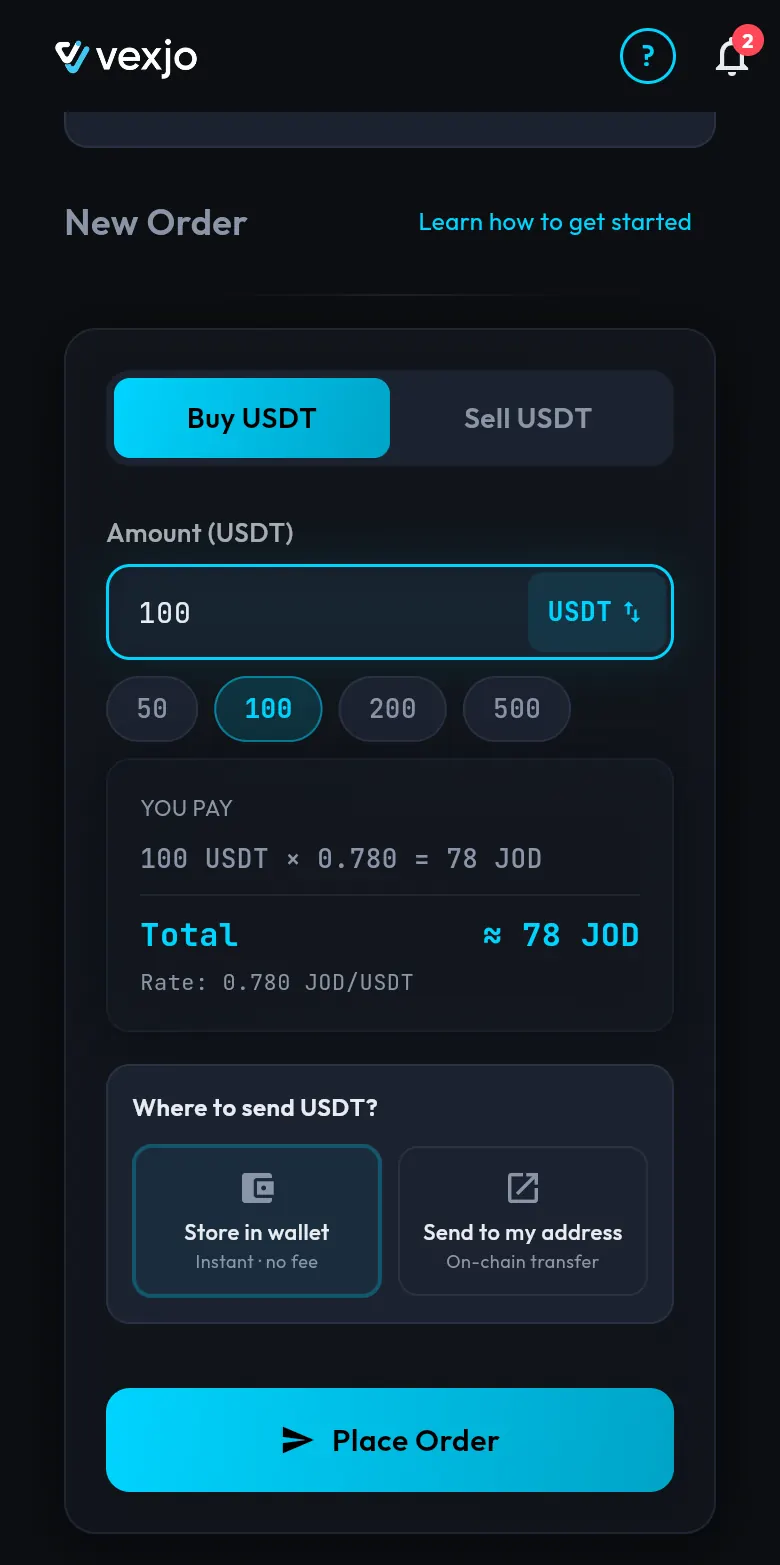
On the home screen, under New Order, keep the Buy USDT tab selected. Type the amount in the Amount (USDT) box, or tap a quick amount: 50, 100, 200 or 500. You can buy from 5 USDT up to 5,000 USDT per order. Prefer to start from dinars? Tap the USDT ⇅ button in the box to type the amount in JOD instead.
As you type, the You pay box shows the price. In our example: 100 USDT × 0.780 = 78 JOD, Total ≈ 78 JOD, at a rate of 0.780 JOD/USDT.
Step 2: Choose where your USDT goes
Under Where to send USDT? you have two choices:
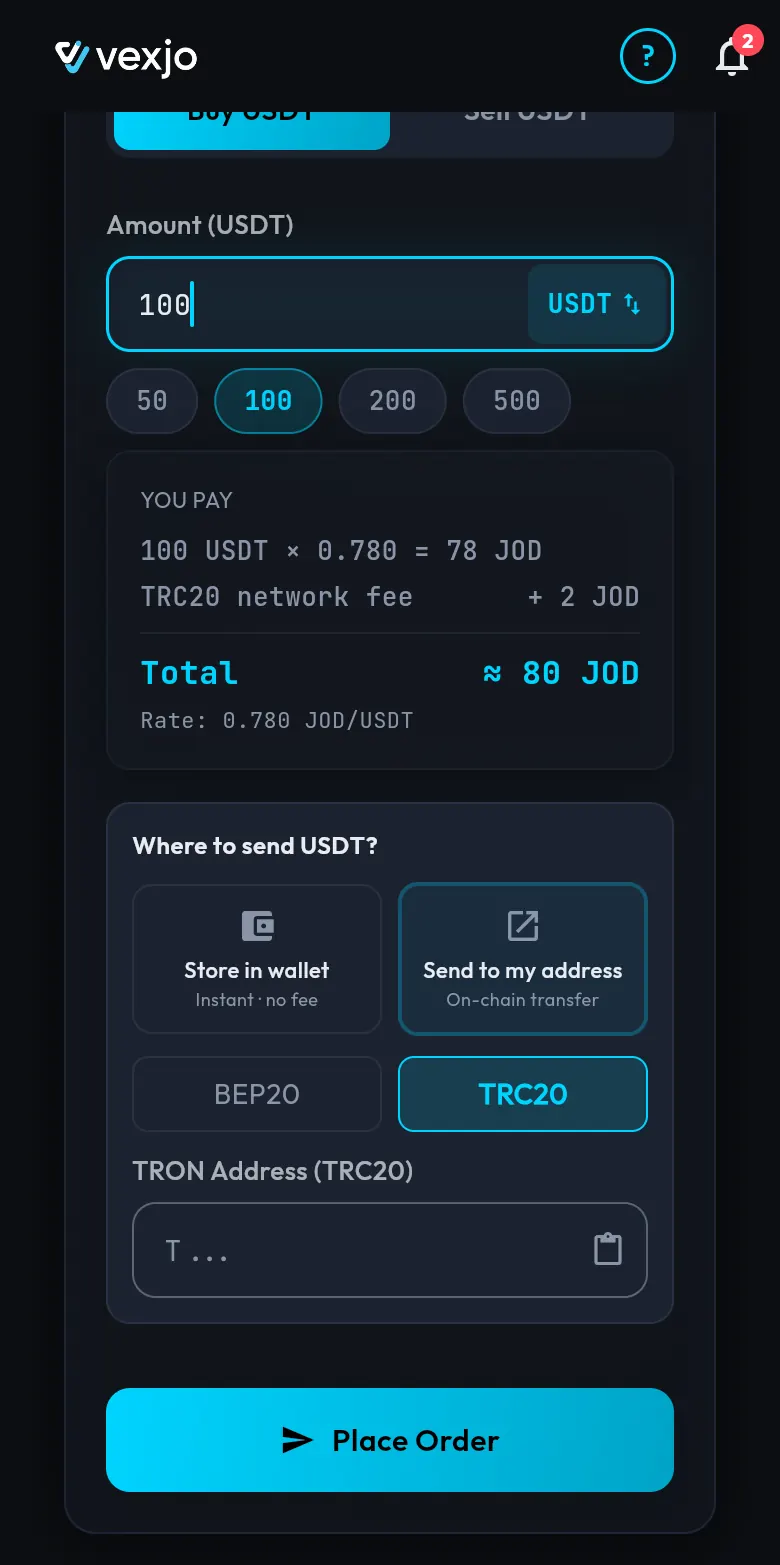
- Store in wallet (Instant · no fee). The USDT goes into your Vexjo wallet. You don’t need a crypto wallet of your own, and you can withdraw to a BEP20 or TRC20 address later.
- Send to my address (On-chain transfer). Choose BEP20 or TRC20, then paste your address in the box (the paste button at the end of the box does it for you). A BEP20 address starts with
0x; a TRC20 (TRON) address starts withT.
No extra fees: the price you see is what you pay. On TRC20, the network fee is already in the JOD price. You see it in the quote before you confirm: on TRC20 a TRC20 network fee + 2 JOD line appears and the total becomes ≈ 80 JOD (the fee on 24 October 2026). On BEP20, nothing is added.
Not sure which network to pick? Read which network to choose when you buy from Vexjo. Always paste an address on the same network you choose: a blockchain transfer can’t be reversed.
Step 3: Place the order and confirm
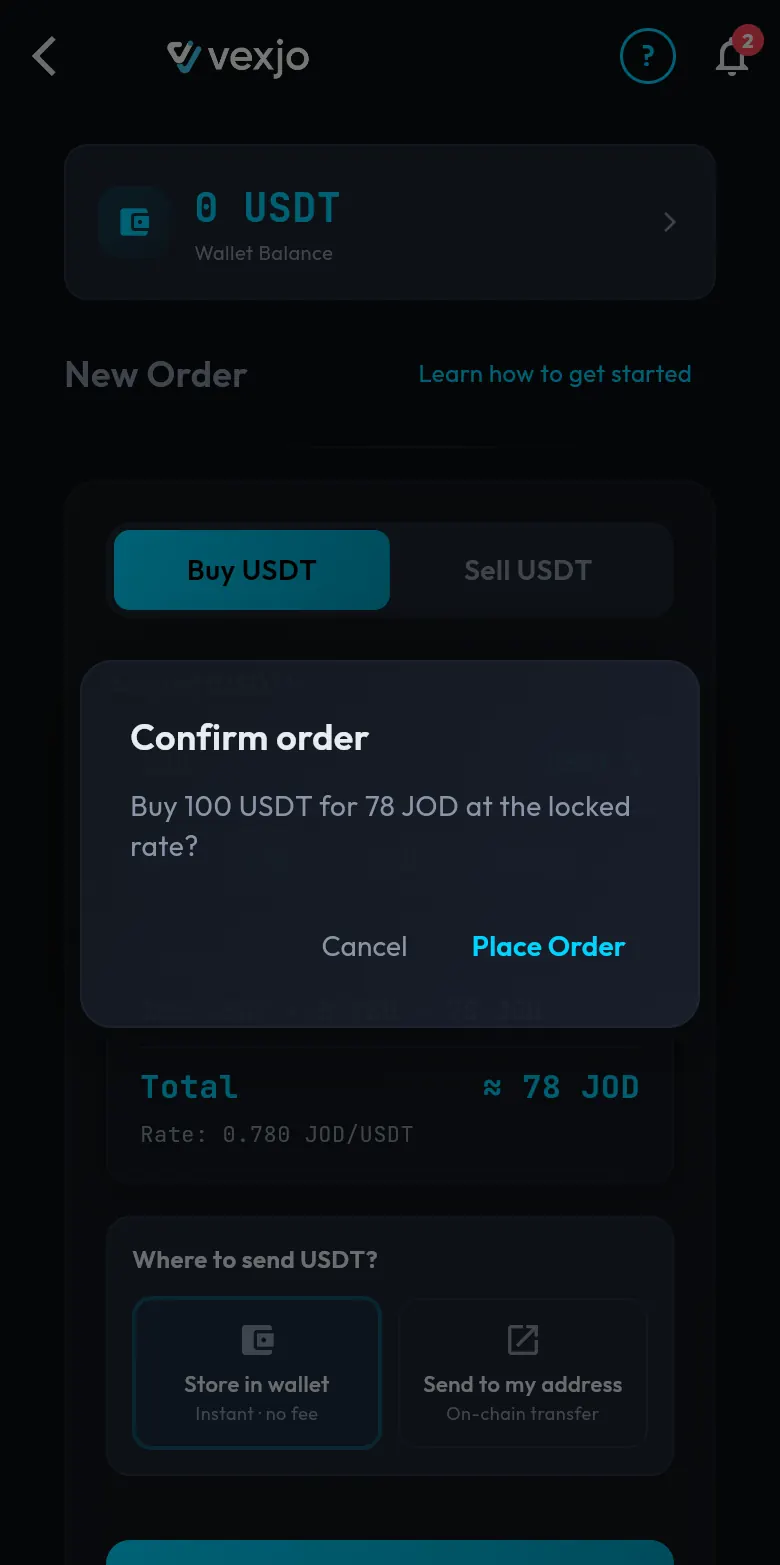
Tap Place Order. A Confirm order box asks, for example: “Buy 100 USDT for 78 JOD at the locked rate?” Tap Place Order again to create the order, or Cancel to go back.
“At the locked rate” means the rate is fixed when the order is created. It doesn’t change while you pay.
Step 4: Pay by CliQ within 30 minutes
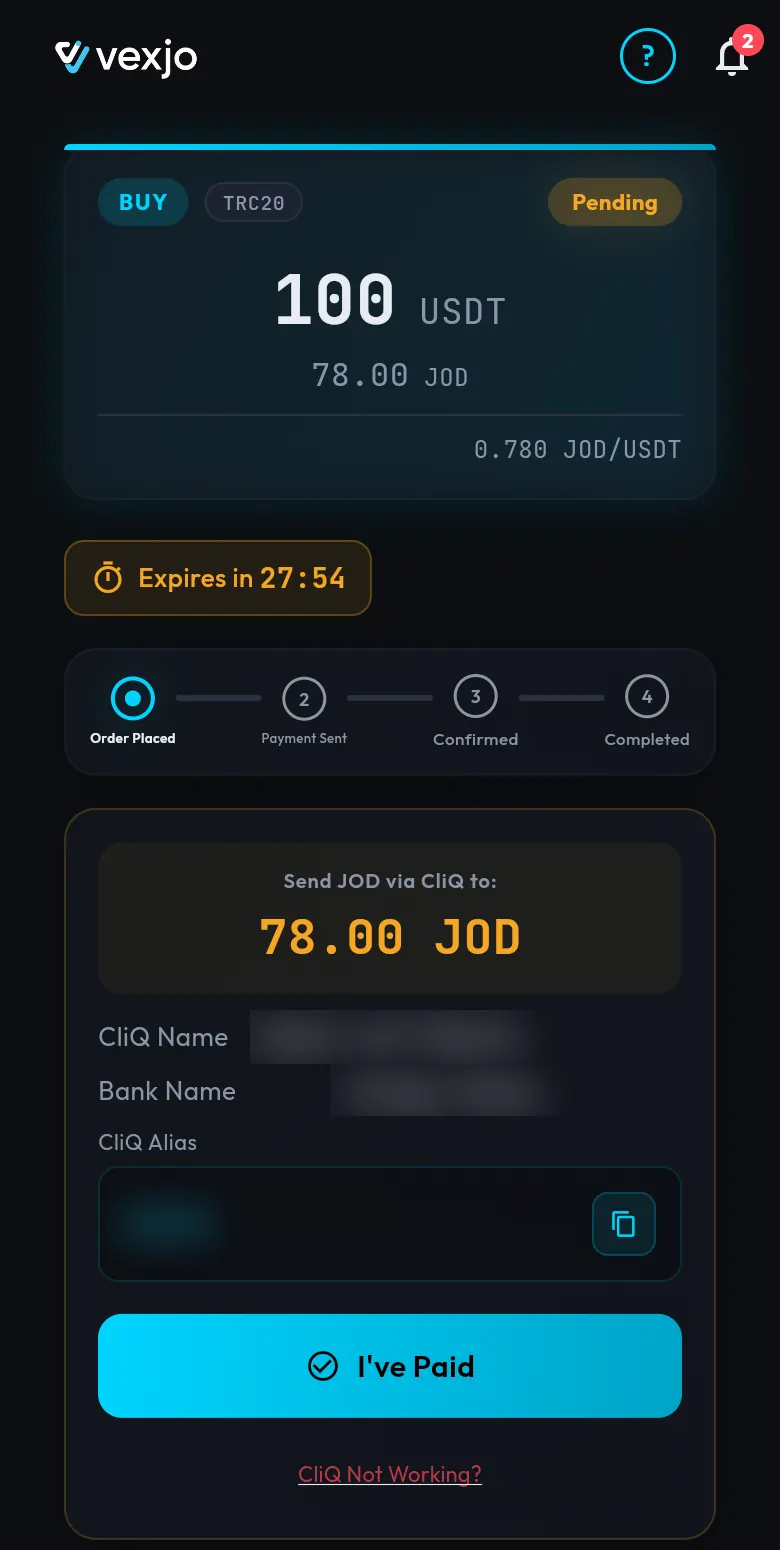
The order screen opens. At the top is your order card: BUY, Pending, 100 USDT, 78.00 JOD, at 0.780 JOD/USDT. Under it, a timer shows Expires in, counting down from 30:00: you have 30 minutes to pay. A progress bar shows four steps: Order Placed → Payment Sent → Confirmed → Completed.
The payment box tells you where to send the money: Send JOD via CliQ to: 78.00 JOD, then the CliQ Name, Bank Name and CliQ Alias, with a copy button next to the alias.
- Tap the copy button next to the CliQ alias.
- Open your bank app and make a CliQ transfer to that alias.
- Send exactly the amount shown (78.00 JOD in our example).
- Come back to Vexjo for step 5.
If plans change, two options help:
- CliQ Not Working? If your transfer to the alias doesn’t go through, tap this link. The app asks you to confirm, then gives your order a different CliQ account. You can do this up to 2 times per order.
- Cancel Order. Changed your mind? You can cancel the order before you pay. Don’t send money to a cancelled or expired order.
Paid and something looks wrong? Message us on WhatsApp (+962 79 090 9910), and don’t place a second order for the same payment. For more on this screen, read paying by CliQ in the Vexjo app.
Step 5: Tap I’ve Paid and get your USDT
After your CliQ transfer, tap I’ve Paid. The order moves to Payment Sent.
Open 24/7. Buying: our team confirms your payment, then USDT goes to your wallet automatically. The order then moves to Confirmed and Completed. If you chose Store in wallet, the USDT shows in your Vexjo wallet balance. If you chose Send to my address, it is sent to your BEP20 or TRC20 address.
Customers we have marked as trusted get their USDT the moment they tap I’ve Paid, before the payment is confirmed.
Buying a large amount
No limit on how much you buy or sell: up to 5,000 USDT per order in the app, as many orders as you need, and any size through our OTC desk. For a large amount, message the OTC desk on WhatsApp (+962 79 090 9910) or meet us face to face in Amman. In the app: CliQ. Through our OTC desk: bank transfer (IBAN) or cash.
Who you are buying from
Vexjo Virtual Assets LLC is a Jordanian company in Amman. Trading USDT for Jordanian dinars since 2016: in person and on WhatsApp first, online platform since 2019. 10,000+ completed trades since 2016 (in person, WhatsApp and the platform).
When you buy on Vexjo, you buy directly from Vexjo, not from another user.
Ready? Open Vexjo at vexjo.com and place your first order. When you want dinars back, read how to sell USDT on Vexjo.
Quick answers
- How long does it take to buy USDT on Vexjo?
- Placing the order and paying by CliQ take a few minutes, and Vexjo is open 24/7. Our team confirms your payment, then USDT goes to your wallet automatically.
- What is the smallest and largest amount I can buy?
- From 5 USDT up to 5,000 USDT per order in the app, as many orders as you need. Any size through our OTC desk, on WhatsApp or face to face in Amman.
- Are there any fees when I buy USDT on Vexjo?
- No extra fees: the price you see is what you pay. On TRC20, the network fee is already in the JOD price; on BEP20 nothing is added.
- Do I need my own crypto wallet?
- No. Choose "Store in wallet" and the USDT goes into your Vexjo wallet; you can withdraw it to a BEP20 or TRC20 address later.
- How long do I have to pay?
- 30 minutes. The order screen counts down under "Expires in", and you can cancel the order before you pay.
- What if the CliQ alias on my order doesn't work?
- Tap "CliQ Not Working?" on the order screen and confirm. The app gives your order a different CliQ account (up to 2 times per order).
- Do I need an invite code to sign up?
- Yes. After you sign up with Google or email and verify your Jordanian mobile number by SMS, you enter an invite code; ask us for one on WhatsApp (+962 79 090 9910).