
Paying by CliQ in the Vexjo app: what you see and what we confirm
Paying by CliQ in the Vexjo app: the amount and alias on your order, the 30-minute timer, the CliQ Not Working? button, and what our team confirms.
In the Vexjo app you pay for USDT by CliQ. After you place a buy order, the order screen shows the exact JOD amount and a CliQ alias. You send that amount from your own bank or wallet app, tap “I’ve Paid”, and our team confirms the payment arrived. Then the USDT goes to your wallet automatically.
This page shows the real payment screen, what to do on it, and what our team checks. It also covers the other direction: when you sell USDT, we pay you by CliQ. In the app: CliQ. Through our OTC desk: bank transfer (IBAN) or cash.
CliQ in one paragraph
CliQ is Jordan’s instant payment system. It is run by JoPACC (Jordan Payments and Clearing Company) under Central Bank of Jordan supervision. There is no separate app to install: you pay from your own bank or wallet app, and you send to an alias or a phone number instead of a full IBAN. The money arrives instantly, at any hour. For the general guide (aliases, limits, fees, what to do after a mistake), see the CliQ guide on JOD Rates, our sister site. The rest of this page is about paying inside the Vexjo app.
What you see after you place a buy order
As soon as you place a buy order, the app opens the order screen. This is what it looked like for a 100 USDT order on 24 October 2026:
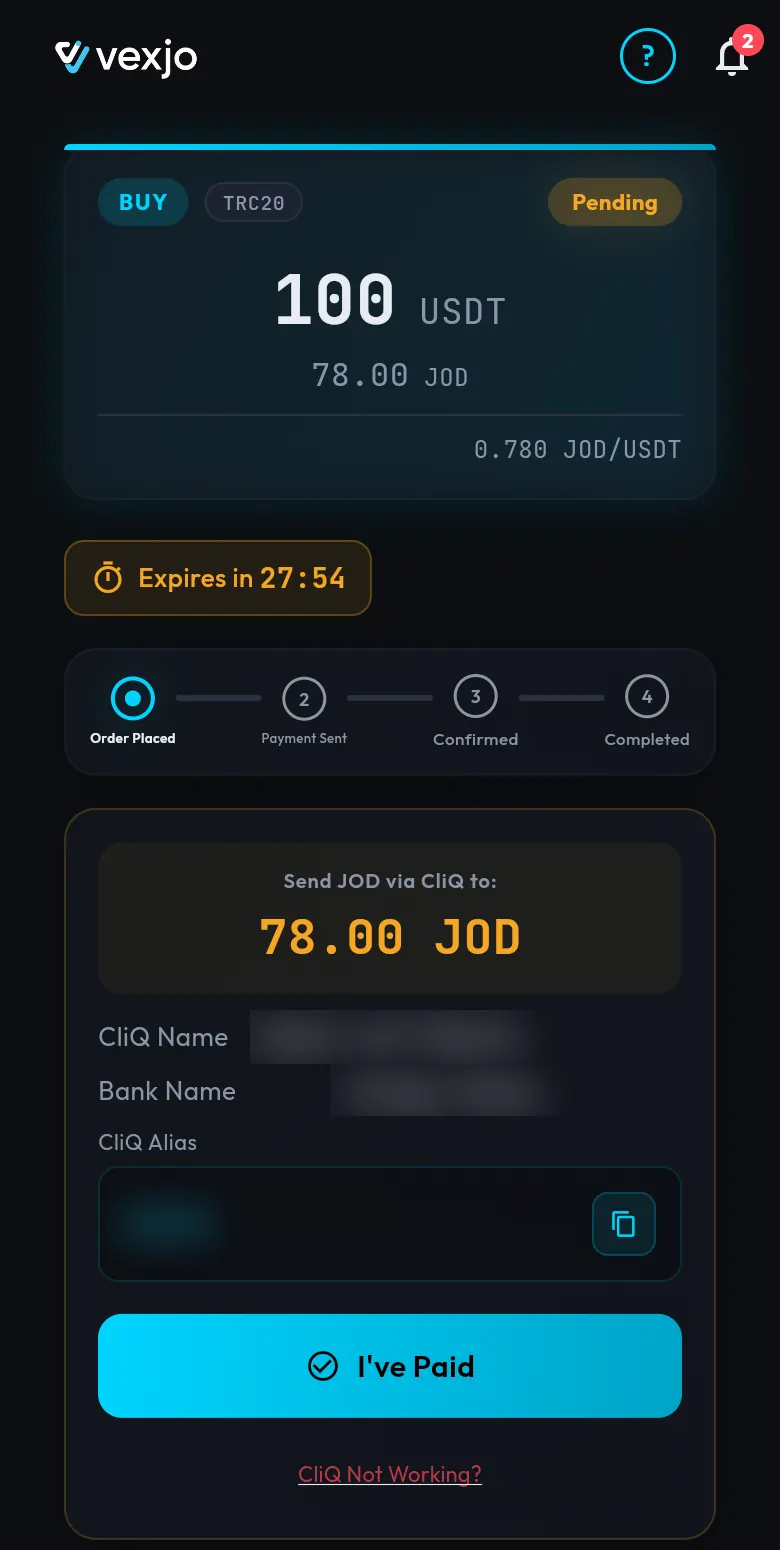
From top to bottom:
- The order card. It shows BUY, the network you chose (TRC20 here), the status Pending, the amount (100 USDT), what you pay (78.00 JOD) and the rate (0.780 JOD/USDT). The amounts are an example from that day. No extra fees: the price you see is what you pay. On TRC20, the network fee is already in the JOD price.
- The timer. It starts at Expires in 30:00 and counts down. You have 30 minutes to pay and tap “I’ve Paid”. If you don’t, the order is cancelled automatically.
- The four steps. Order Placed → Payment Sent → Confirmed → Completed. The highlighted step shows where your order is.
- The payment box. It says Send JOD via CliQ to: with the exact amount (78.00 JOD), then the CliQ Name, the Bank Name and the CliQ Alias. The alias has a copy button next to it.
- The “I’ve Paid” button, and under it the CliQ Not Working? link.
Why the CliQ details can change from order to order
Vexjo receives payments on several CliQ accounts, and each order is given one of them. So the name, bank and alias on today’s order can differ from your last one. Always pay to the details on the order you have open. Don’t reuse an alias you saved from an earlier order.
How to pay, step by step
- Tap the copy button next to CliQ Alias.
- Open your own bank or wallet app and start a CliQ transfer to that alias.
- Before you confirm, look at the name your bank app shows and check it against the CliQ Name on your order.
- Type the exact amount from the order (78.00 JOD in the example) and send.
- Go back to Vexjo and tap “I’ve Paid”. The app asks you to confirm, because this step can’t be undone. Your order then moves to Payment Sent.
For the whole buy flow, from choosing the amount and network to getting your USDT, see how to buy USDT in the Vexjo app. Not sure which network to pick? See TRC20 or BEP20: which network to choose.
”CliQ Not Working?”: getting a different CliQ account
Sometimes a bank app can’t send to an alias, for example when the alias is not found. In that case, tap CliQ Not Working? under the “I’ve Paid” button. The app asks you to confirm:
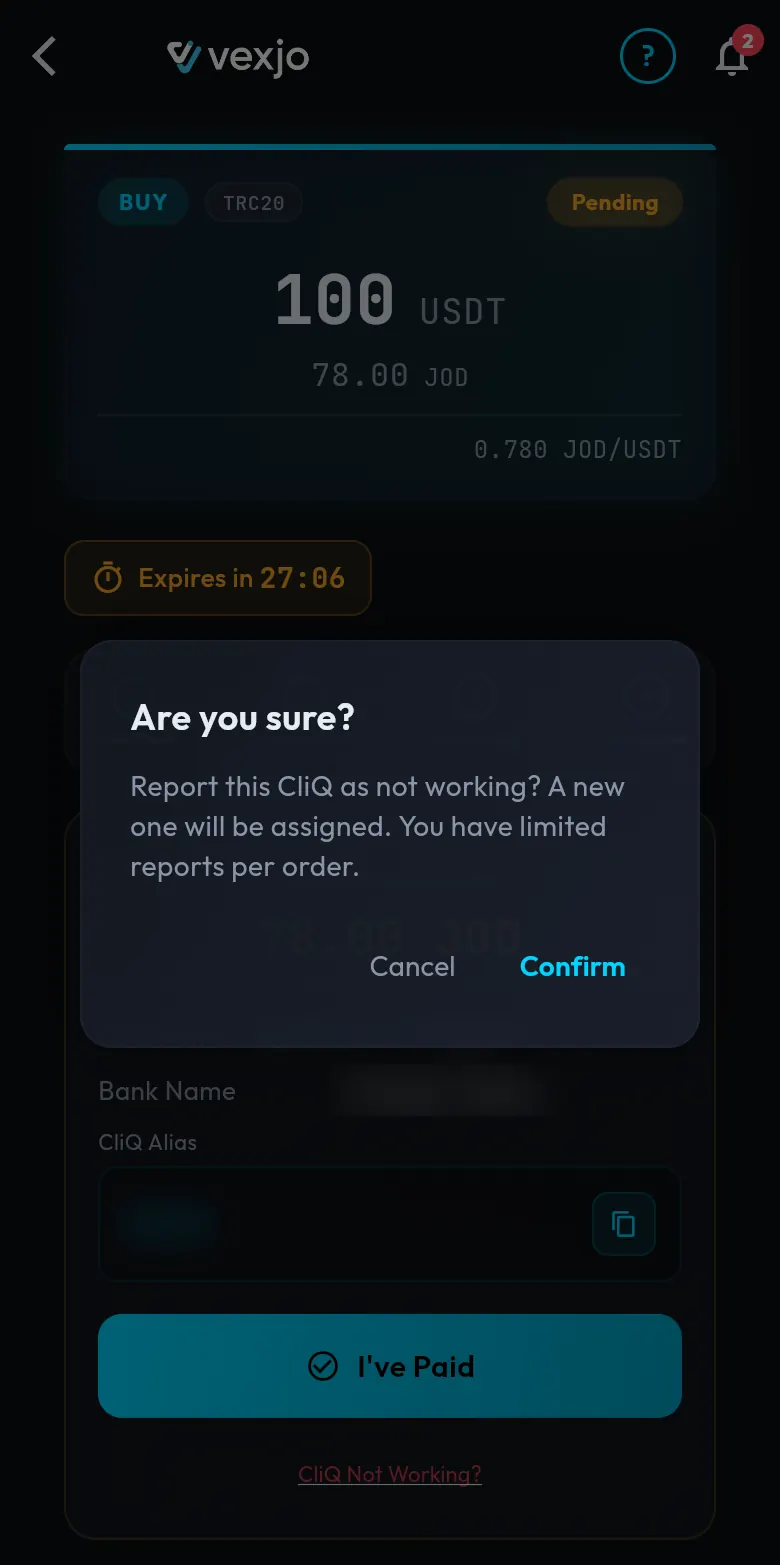
Tap Confirm and a different CliQ account is put on your order: new name, bank and alias. You can do this up to 2 times per order. The 30-minute timer keeps running, so pay to the new details straight away.
Use this only when the transfer could not be sent. If the money already left your account to the first alias, don’t report it. Contact our support and keep your CliQ reference ready.
What our team confirms
When you tap “I’ve Paid”, our team checks one thing: that a CliQ payment for your order’s exact amount has arrived. When it has, the order is confirmed and the USDT is sent automatically, to your Vexjo wallet or to your own BEP20 or TRC20 address, whichever you chose for the order.
Open 24/7. Buying: our team confirms your payment, then USDT goes to your wallet automatically. Selling: we check your USDT on the blockchain automatically, then send your dinars.
Tips so your payment is confirmed quickly
- Pay from your own account. Payments from other people’s accounts may be refused.
- Pay the exact amount on the order. Not more, not less.
- Pay within the 30 minutes, and tap “I’ve Paid” before the timer ends.
- Keep the CliQ reference your bank app shows after the transfer.
- Don’t tap “I’ve Paid” before you have paid.
If you sent a wrong amount by mistake, contact our support right away.
When you sell: we pay you by CliQ
Selling works the other way round: you send USDT, and we send the dinars to your CliQ. You add your CliQ details once:
- the bank or wallet your CliQ is on (a wallet such as Orange Money, Zain Cash or Dinarak, or a bank)
- your CliQ display name
- your CliQ alias
Until you add them, the sell screen shows a note with a Set up link:
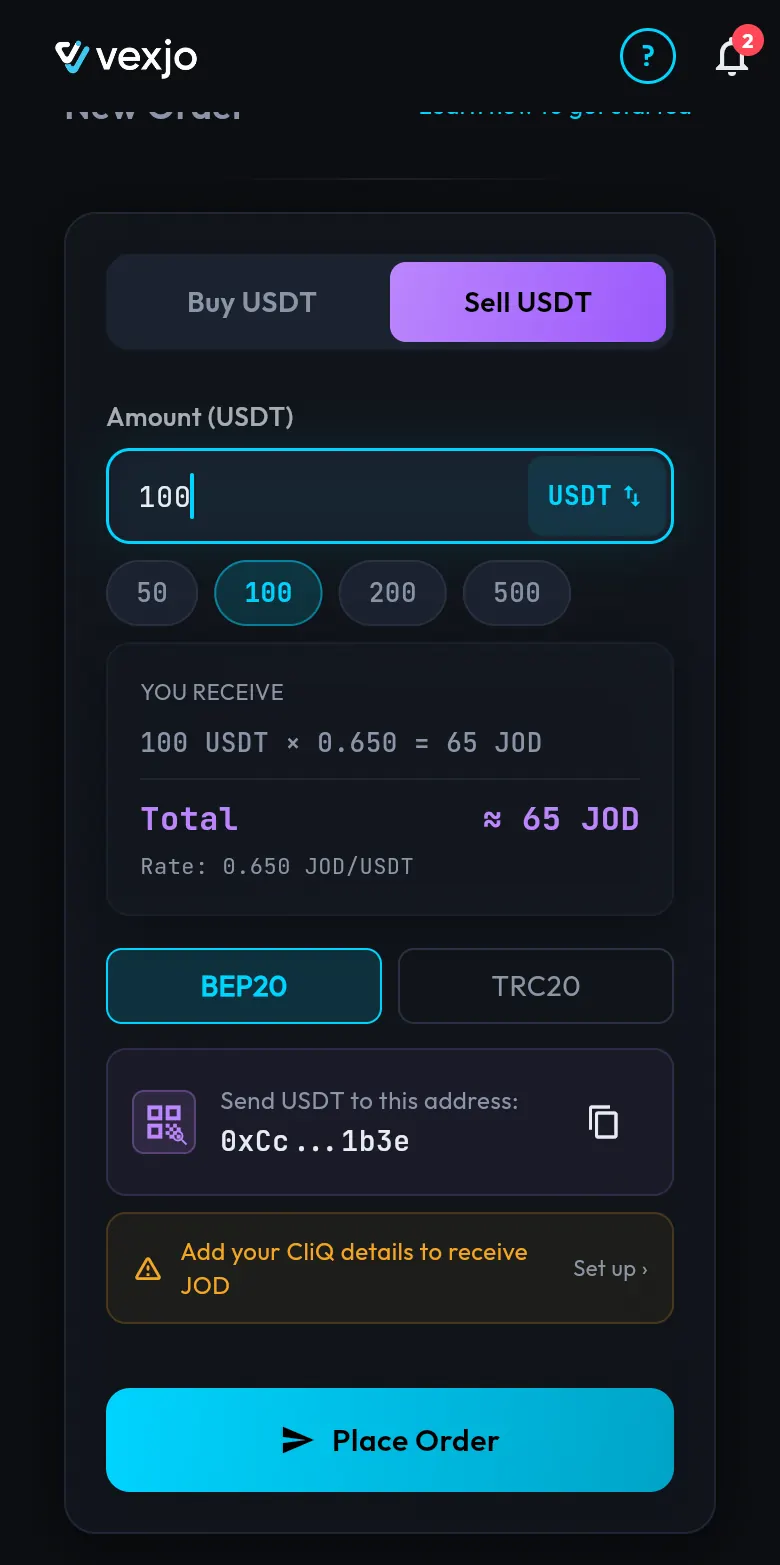
After we check your USDT on the blockchain, the dinars go to that alias. Make sure the alias is still active on your bank or wallet. For the full sell flow, see how to sell USDT in the Vexjo app.
Vexjo Virtual Assets LLC is a Jordanian company in Amman. CliQ is how you pay and get paid in the Vexjo app: the order screen gives you the amount and the alias, you pay from your own account, and our team confirms the payment before your USDT is sent.
Quick answers
- How do I pay by CliQ in the Vexjo app?
- Place a buy order, copy the CliQ alias shown on the order screen, and send the exact JOD amount from your own bank or wallet app. Then tap "I've Paid".
- How long do I have to pay?
- 30 minutes. If you don't pay and tap "I've Paid" in that time, the order is cancelled automatically.
- Why is the CliQ alias different from my last order?
- Vexjo gives each order one of its CliQ receiving accounts, so the details can change. Always pay to the ones on the order you have open.
- What if the CliQ alias doesn't work?
- Tap "CliQ Not Working?" under the "I've Paid" button and confirm. A different CliQ account is put on your order, up to 2 times per order.
- Can I pay from someone else's account?
- Pay from your own bank or wallet account. Payments from other people's accounts may be refused.
- What does the Vexjo team check before sending USDT?
- That a CliQ payment for your order's exact amount has arrived. Then the USDT goes to your wallet automatically, 24/7.
- How do I get dinars by CliQ when I sell USDT?
- Add your CliQ details once: bank or wallet, CliQ display name and CliQ alias. After we check your USDT on the blockchain, we send the dinars to that alias.