
How to sell USDT on Vexjo and get dinars by CliQ (with app screenshots)
Sell USDT on the Vexjo app, step by step with real screenshots: choose BEP20 or TRC20, send your USDT, paste the hash and get dinars by CliQ.
To sell USDT on Vexjo, open the app, tap Sell USDT, enter the amount, choose BEP20 or TRC20 and place the order. Then send exactly that USDT to the address on your order screen and paste the transaction hash. We check your USDT on the blockchain automatically, then send your dinars by CliQ.
This guide walks through each screen of the Vexjo app. The screenshots were taken in the live app on 24 October 2026. The numbers in them (100 USDT for 65 JOD, at a rate of 0.650) are a snapshot of that day only: prices are tiered by order size and change during the day, and the app always shows you the current rate before you confirm.
Want the wider picture, with every way to sell USDT in Jordan and not only Vexjo? JOD Rates, our sister site, has a general guide to selling USDT in Jordan.
What you need
- A Vexjo account. Sign-up needs a Jordanian mobile number (checked by SMS) and an invite code. Ask for a code on WhatsApp (+962 79 090 9910).
- USDT on BEP20 or TRC20, in your own wallet (Trust Wallet, MetaMask, TronLink and others) or on an exchange that lets you withdraw on these networks. Keeping your USDT on Binance? See how to withdraw USDT from Binance to a Jordanian bank.
- Your CliQ details: the bank or wallet your CliQ is on, your CliQ name and your CliQ alias. This is where your dinars go.
Step 1: Open Sell USDT and enter the amount
On the home screen, under New Order, tap the Sell USDT tab. Type the amount in USDT, or tap a quick amount: 50, 100, 200 or 500. The USDT ⇅ button lets you type the amount in JOD instead.
The box below shows what you receive before you commit to anything. On 24 October 2026, 100 USDT showed “100 USDT × 0.650 = 65 JOD”, a Total of about 65 JOD and the rate. Selling starts from 10 USDT, up to 5,000 USDT per order.
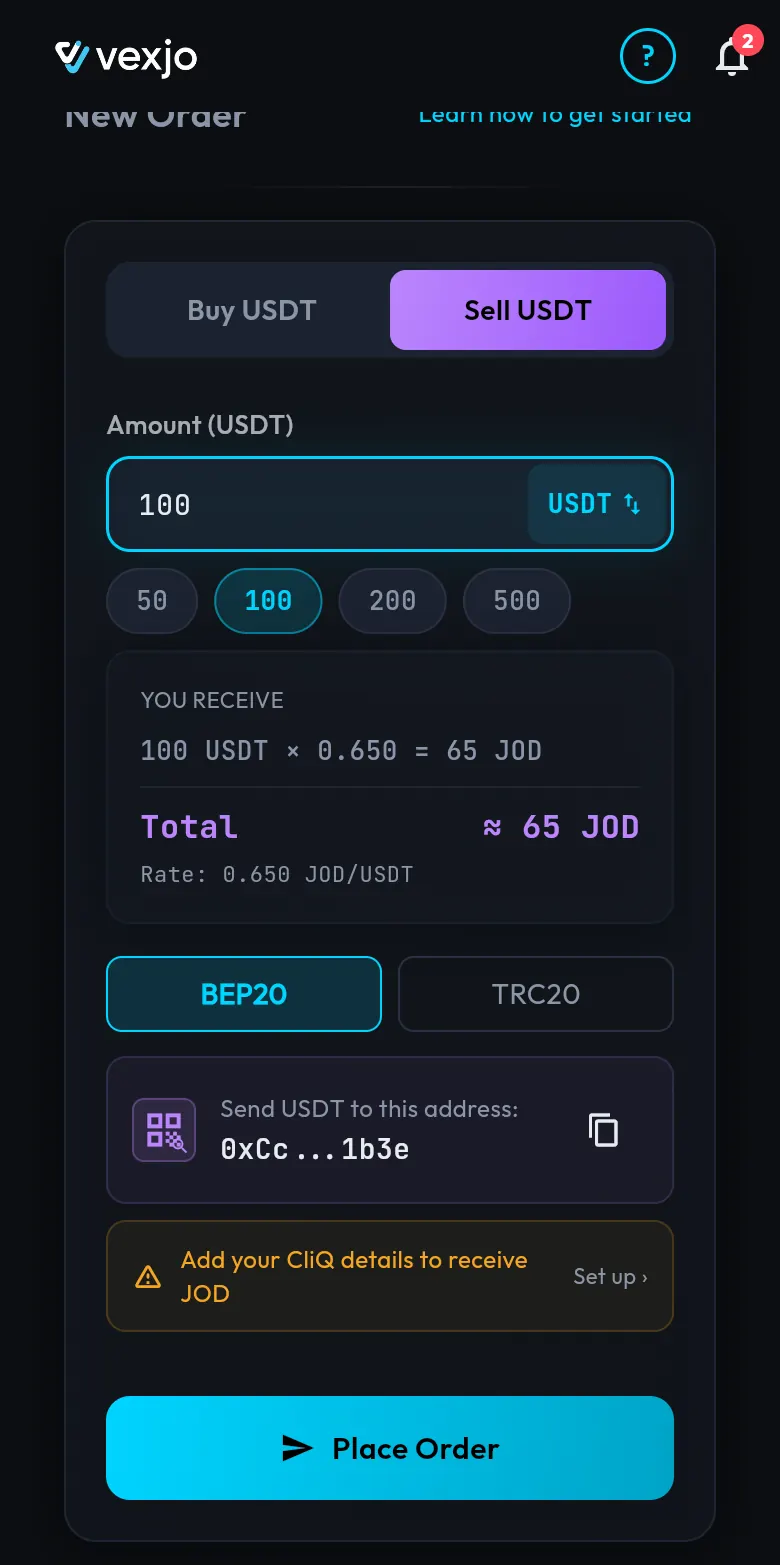
The rate depends on the order size and moves during the day. It is locked when you place the order (Step 4), so it does not change while you send.
Step 2: Choose the network you will send from
Tap BEP20 or TRC20: the network your USDT will leave on. If your USDT is already on TRON, choose TRC20; there is no need to move it first. Not sure? See which network to choose on Vexjo.
Our deposit address for that network appears right on the form, under Send USDT to this address:, with a copy button and a QR icon.
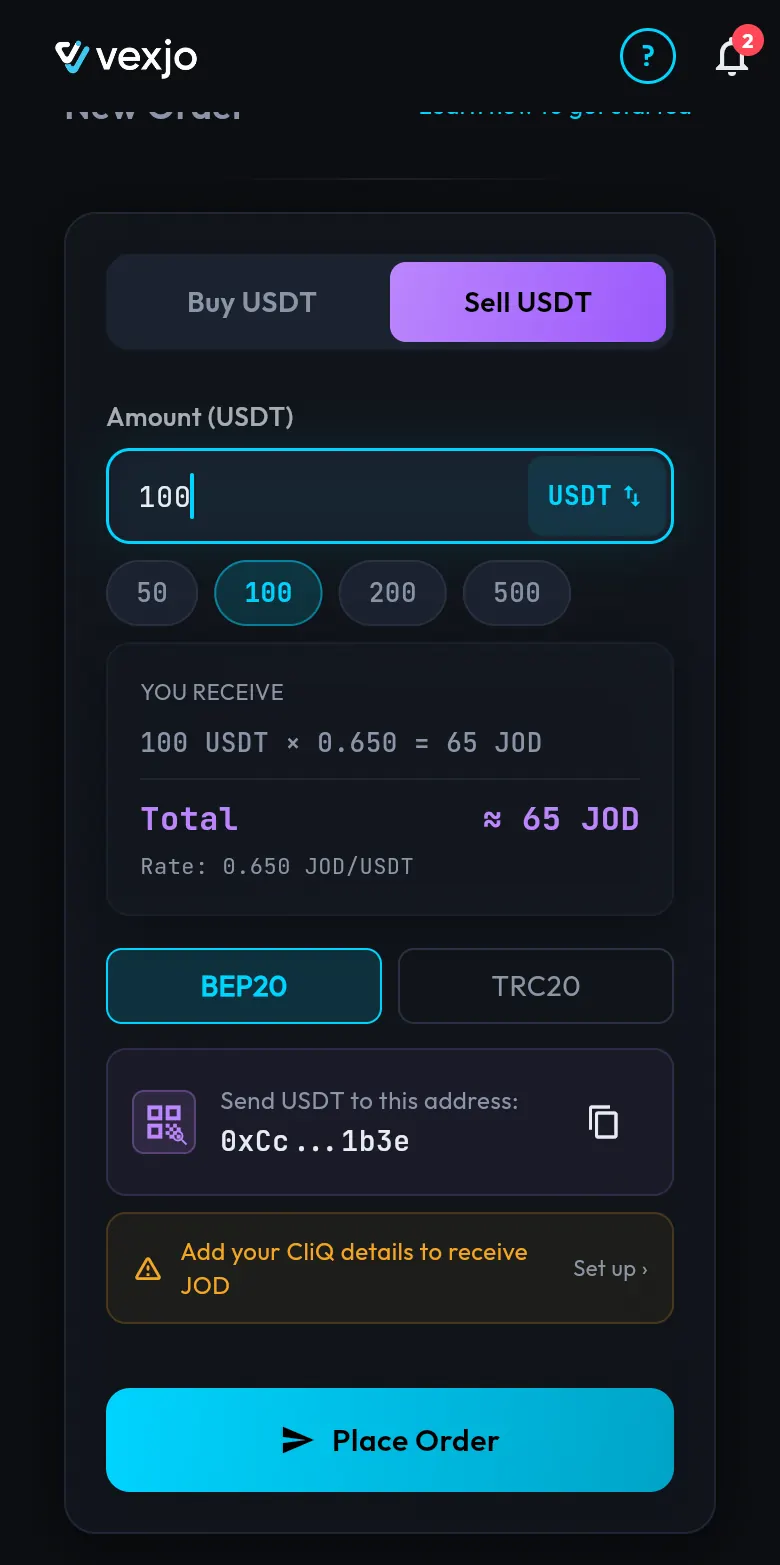
Always copy the address from your own order screen, never from a picture. In the screenshots on this page the full address is blurred and the QR code is cut off on purpose.
Step 3: Add your CliQ details (if the form asks)
To pay you, we need your CliQ details. If they are missing, the form shows Add your CliQ details to receive JOD with a Set up link (you can see it in the screenshot above). Tap it and fill in three things right on the form:
- Your bank or wallet. The list has wallets such as Orange Money, Zain Cash and Dinarak, and banks such as Arab Bank.
- Your CliQ name, the display name on your CliQ.
- Your CliQ alias.
Check them carefully: the dinars go to exactly this CliQ. If your CliQ details are already saved, the form shows them instead.
Step 4: Place the order
Tap Place Order. The app asks you to confirm, for example: “Sell 100 USDT for 65 JOD at the locked rate?” Confirm, and the rate is locked.
Step 5: Send the USDT within 60 minutes
Your order screen opens. At the top you see SELL, the network, the status Awaiting Crypto, the USDT amount, the JOD you will get and the rate. Below it is a timer, Expires in 60:00: you have 60 minutes to send.
A row of five steps shows where your order is: Order Placed → Awaiting USDT → USDT Received → Sending JOD → Done.
Under Deposit USDT to: you see the exact amount (here 100 USDT), the network, and the full address with a copy button and a QR code. Your CliQ name and alias are shown too, so you can check where the dinars will go.
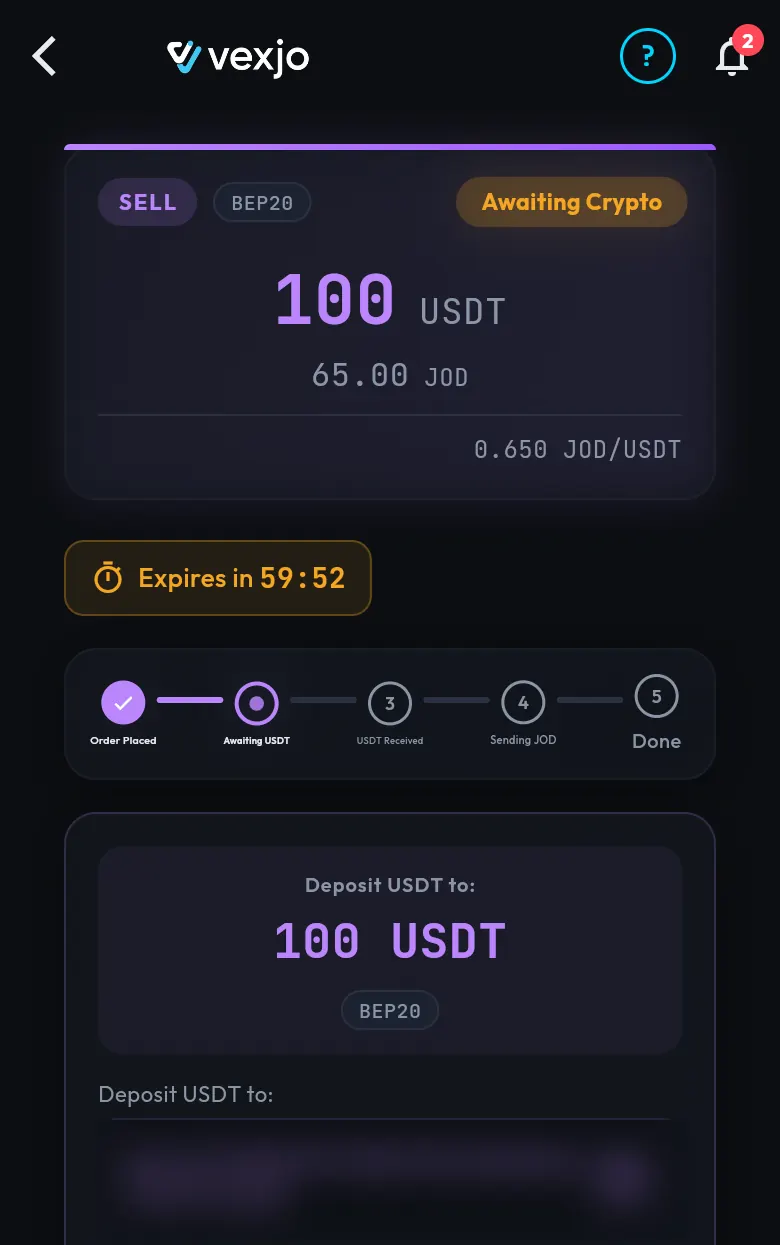
Now send from your wallet or exchange:
- Choose Send or Withdraw for USDT.
- Pick the same network as your order. Exchanges often call them BSC/BEP20 and TRX/TRC20.
- Paste the address you copied from your order screen, then compare the first and last few characters.
- Enter the exact amount from your order. Some exchanges take their withdrawal fee out of the amount you send, so make sure the full amount arrives.
- Confirm the transfer.
Changed your mind? You can cancel the order before you send the USDT. If the timer runs out before you send, the order expires; just place a new one.
Step 6: Paste the transaction hash
Your wallet or exchange gives every transfer a transaction hash (also called a TxID). You find it in the transfer details or in the withdrawal history. Copy it.
Back on your order screen, below the address, paste it into the Transaction Hash box and tap Submit Transaction.
Step 7: Get your dinars by CliQ
After you submit the hash, we check your USDT on the blockchain automatically, then send your dinars by CliQ. The steps on your order move on to USDT Received, then Sending JOD, then Done. Vexjo is open 24/7, and CliQ transfers are instant, so the dinars reach your account as soon as they are sent.
If less USDT arrives than you ordered
This usually happens when the sending exchange takes its withdrawal fee out of the amount. If what arrives is up to 2% less than your order, the app shows the amount received and the new JOD total at the rate locked when you ordered. Accept it in one tap (“Settle at received amount?”) and the order settles at the received amount. If the gap is more than 2%, the app asks you to contact support.
To avoid it: send the exact amount, on the right network, and paste the hash.
Sent more than the order, or sent after the order expired? Message us on WhatsApp (+962 79 090 9910) with the transaction hash. USDT sent on the wrong network is usually lost for good; message us about it too, but recovery is not guaranteed.
Selling a large amount, or want cash or a bank transfer?
No limit on how much you buy or sell: up to 5,000 USDT per order in the app, as many orders as you need, and any size through our OTC desk.
For a large amount, talk to our OTC desk on WhatsApp (+962 79 090 9910) or meet us face to face in Amman. In the app: CliQ. Through our OTC desk: bank transfer (IBAN) or cash.
Already have USDT in your Vexjo wallet?
Then you do not need to send anything on the blockchain. In your wallet, tap Swap, choose USDT → JOD and confirm. Then use Withdraw JOD to get the dinars by CliQ.
Why sell on Vexjo
- Vexjo Virtual Assets LLC is a Jordanian company in Amman.
- Trading USDT for Jordanian dinars since 2016: in person and on WhatsApp first, online platform since 2019.
- 10,000+ completed trades since 2016 (in person, WhatsApp and the platform).
- No extra fees: the price you see is what you pay. On TRC20, the network fee is already in the JOD price. When you sell, nothing is taken off the JOD total on either network: the dinars shown before you confirm are the dinars you get.
- Open 24/7. Buying: our team confirms your payment, then USDT goes to your wallet automatically. Selling: we check your USDT on the blockchain automatically, then send your dinars.
Ready to sell? Open Vexjo. The order form shows the dinars you will get before you confirm.
Read next: How to buy USDT on Vexjo · The true cost of USDT in Jordan
Quick answers
- How do I sell USDT on Vexjo?
- Tap Sell USDT, enter the amount, choose BEP20 or TRC20 and place the order. Send the exact USDT to the address on your order screen within 60 minutes, then paste the transaction hash and tap Submit Transaction.
- How much USDT can I sell on Vexjo?
- Selling starts from 10 USDT. No limit on how much you buy or sell: up to 5,000 USDT per order in the app, as many orders as you need, and any size through our OTC desk.
- How fast do I get my dinars?
- Open 24/7. After you submit the transaction hash, we check your USDT on the blockchain automatically, then send your dinars by CliQ.
- Which networks can I send USDT on?
- BEP20 (BNB Smart Chain) or TRC20 (TRON) only. You choose the network when you place the order and send on exactly that network; ERC20 and other networks are not supported.
- Are there fees when I sell?
- No extra fees: the price you see is what you pay. The JOD total shown before you confirm is what you receive; only your own wallet or exchange may charge a fee to send the USDT.
- What if a little less USDT arrives than I ordered?
- If it is up to 2% less, for example because the exchange took a withdrawal fee, you can settle at the received amount in one tap, at the rate locked when you ordered. Bigger shortfalls go to support.
- Can I sell a large amount or get paid in cash?
- Yes, through our OTC desk on WhatsApp (+962 79 090 9910) or face to face in Amman. In the app: CliQ. Through our OTC desk: bank transfer (IBAN) or cash.